Landspitali - University Hospital
Login and instructions
In the app you can:
look at your admission history, appointments, allergies and wait list.
srequest service and track status of your treatments and examinations.
get access to educational materials about medications, referrals, and departmental staff.
The app is available in the App Store and Play Store. The name is Landspitali
You need an electronic ID or the authentication app to open the Landspítali app.
User guide
Authorization for Children Under 16
Parents and guardians can register as an authorized proxy for their children under 16 in the app. This access is based on legal guardianship information from the National Registry.
To log in for a child in the app, go to:
Meira
Skra sig inn sem umbodsadili, and the individuals for whom you have a proxy will appear.
If you are unable to log in for a child despite having guardianship, you should contact the National Registry.
Authorization for Adolescents age 16 to 18 and Other Relatives
Adolescents aged 16-18 and adults must grant authorization for others to access their data. To grant or revoke authorization in the app, you go to:
Meira
Veita/Afturkalla umboð
This will open the Ísland.is authorization system, which will guide you through the process.
How the Authorization System Works
The system is from Digital Iceland.
When you use your authorization, you first log in with your own electronic ID, then select the individual for whom you have authorization.
This method ensures security and traceability.
Overview of the results of various tests conducted at Landspítali and how they appear in the Landspítali app.
Test results are displayed in chronological order along with the status of each test.
Results of general blood tests appear with a two-day delay.
Test results from the Department of Microbiology and Virology are only shown for patients of the Dermatology and STI outpatient clinic and the Infectious Diseases outpatient clinic (HIV, syphilis, hepatitis B and C, chlamydia, and gonorrhea).
In some cases, a healthcare professional will contact you about the results before they appear in the app.
A negative result generally means that you do not have the condition being tested for.
A positive result generally means that you have been diagnosed with the condition being tested for.
In the Dagbók, you get a chronological overview of:
Appointments.
Tests, booked imaging, booked and completed procedures, arrivals, and discharges.
Test results and discharge summaries from the cardiac department.
Information about your stay in the Emergency Department, including which doctor treated you and vital sign measurements.
Appointments
In the Timeline, you can:
change an appointment.
see who your appointment is with and where to go via Google Maps.
add the appointment to your personal calendar.
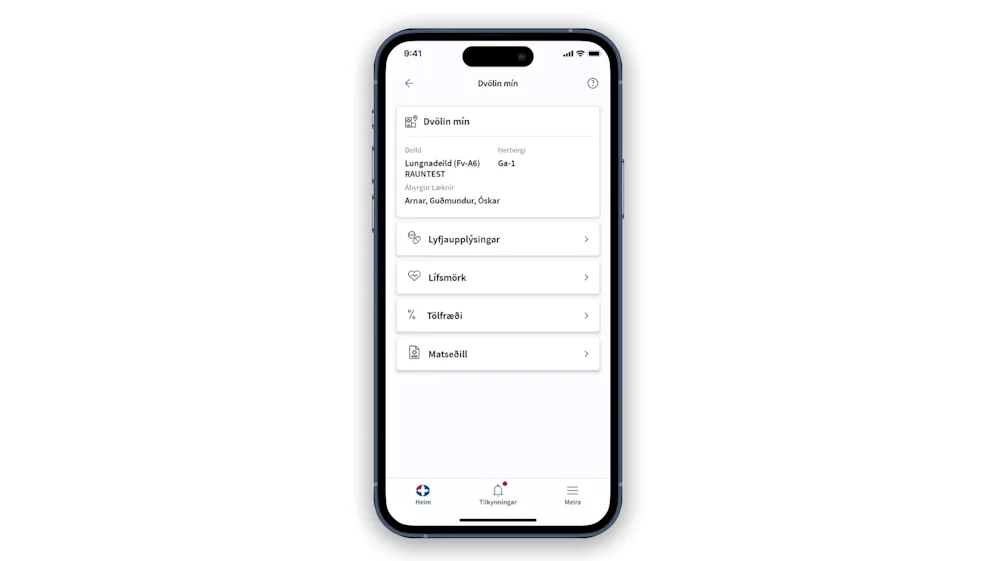
By selecting “My Stay, (Dvölin mín)” information relevant to the individual's inpatient stay is displayed. For example, the names of the staff involved in the care are shown—such as the responsible doctor, responsible nurse, and responsible healthcare assistant.
Vital sign measurements and their progress are shown in real time, as well as an overview of medications administered during the hospital stay. It is also possible to view the menu and respond to a service survey about the food. Upon discharge, a service survey is sent to the individual.
Once the individual is discharged, no data is displayed under "My Stay".
The individual can update their phone number, height, and weight in their personal information, and these details are saved in the medical record at Landspítali. The individual can also view information about registered allergies, blood type, an overview of requests and referrals, and documented treatments.
The individual can add next of kin and define their relationship to them. It is also possible to set whether the next of kin may receive information and whether they should receive SMS notifications, by checking the appropriate boxes. For example, a next of kin can receive real-time updates about a surgical procedure if the second box is checked.
Next of kin can view appointments. See more in the section on “Proxy.”
Follow a Procedure
In order to track the status of a procedure in the app, the individual undergoing the procedure must define you as a next of kin and check the option to have SMS notifications sent to you.
All certificates and educational materials sent from Landspitali through the app are .pdf documents.
Certificates appear in the app under Heilsufar
Educational materials appear under Samskipti
If you have undergone a procedure at Landspítali and received an implant, you can view an implant card for each implant in the app under Health/Implants.
After clicking on the implant card, an option appears to add it to your phone’s wallet. The implant card includes a QR code that links to this website: Information about implants.