Service web for web masters: Adding documents and photos
How to work with assets in Contentful
Assets are files uploaded to the web management system such as photos and documents. The files can be of various types, for example: pdf - png - jpg - xlsx - mp4 - pptx.
When uploading a file, a long URL will be created that begins with.... https://assets.ctfassets.net/... This is the file's "home address". But you need to find it's "home" field so the image or file appears on pages. Many content groups can accept Assets. The system controls through the Embed button what kind of files can be displayed where. Good to remember when working with Asset:
Make sure to upload the file to both the Icelandic and English fields - otherwise the asset will not appear with the English translation. The file must be entered in both the Icelandic and English fields.
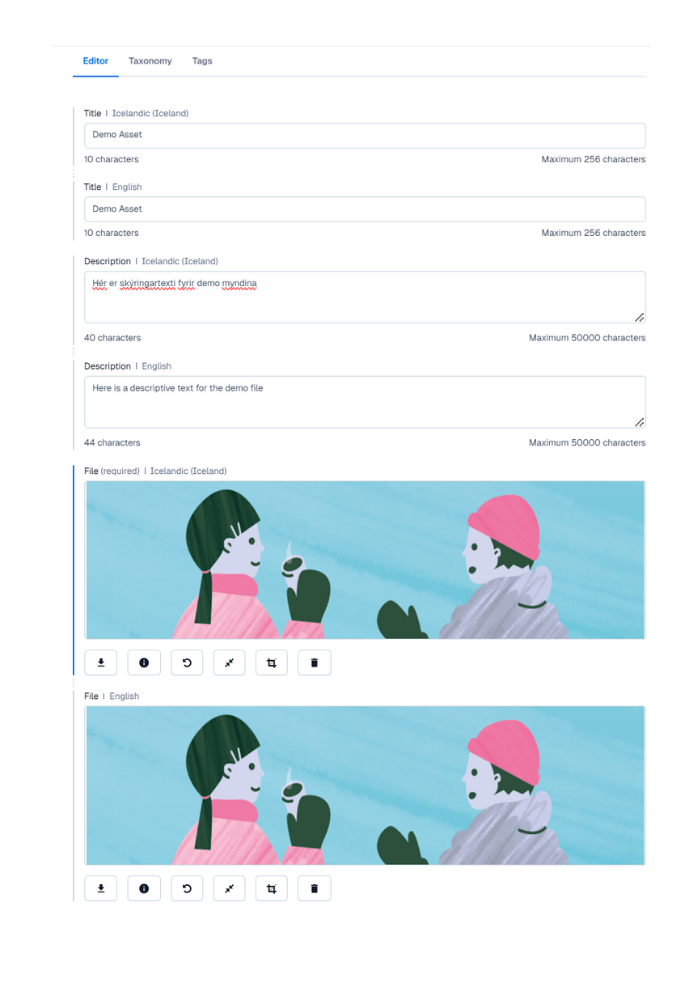
Give the Asset a clear and descriptive name. It is important not only for you, if you need to find this file later. It is also important for external search engines such as Google, and for accessibility on the web. The screen reader that visually impaired users, and others, use reads the titles of the files.
Example of a good title
- A presentation for the awareness campaign Let's talk
- Handbook on the human resources of special education doctors at Landspítali (June 2024)
- The Association of Radiology - Pay table - 1 April 2025
- Video: Are you okay after the day?Examples of not so good names:
- Reviews - Swedish
- Annual report 2023
- 2 Birkir Hallormsstaður (March 2025)
- Ölvir Músapóster closes
Service web for web masters
Ertu með ábendingu eða spurningu?