Service web for web masters: Change front page
Organization page structure
Once the title, slug and institution are in, you can start setting up the content of the page. The most important thing is to choose
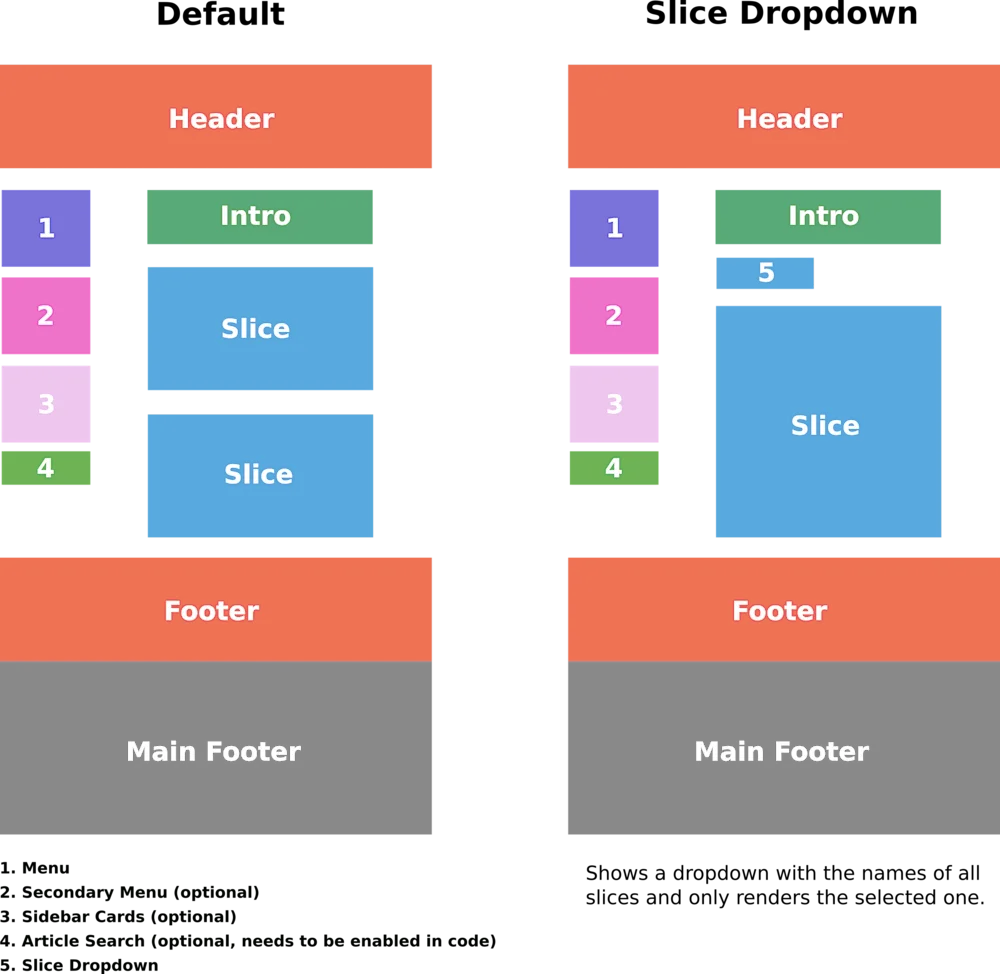
Introduction text that appears at the top of the page.
Select institutions (Theme).
Traces (see list of species below), the material to be used should be ready.
Bottom slices - commonly used to have news horns as bottom slice (see below).
Menu - The links to be in the sidebar menu.
In addition, it is possible (but not necessary) to install
Secondary menu
Sidebar card - useful for notifications (example: changed opening times, advertised for applications)
Search engine - search in articles belonging to the organization (coding can only be activated so it needs the involvement of the programmers)
Reminder: When you insert a material, you can usually select both "Add existing content" or "Create new". It is possible to use the same object in several places (e.g. links or rafts).
The following image shows the structure of Organization Page
Slices
The following raft can be used on the institutional pages and sub-pages (see more under contentful and beta website).
Service web for web masters
Ertu með ábendingu eða spurningu?